

 English
 Español
 中文
Safer player sign-in from November 3: what changed for players and staff
هذه المقالة غير متوفرة بعد باللغة العربية. نعرضها باللغة الإنجليزية.
Starting Monday, November 2, player sign-in at ggLeap centers is safer. This article explains what changed, first for players and then for center staff and owners.
For players
What changed
Sign in with your username and password at this center. If they don't work, ask the center's staff to reset your password, or create an account.
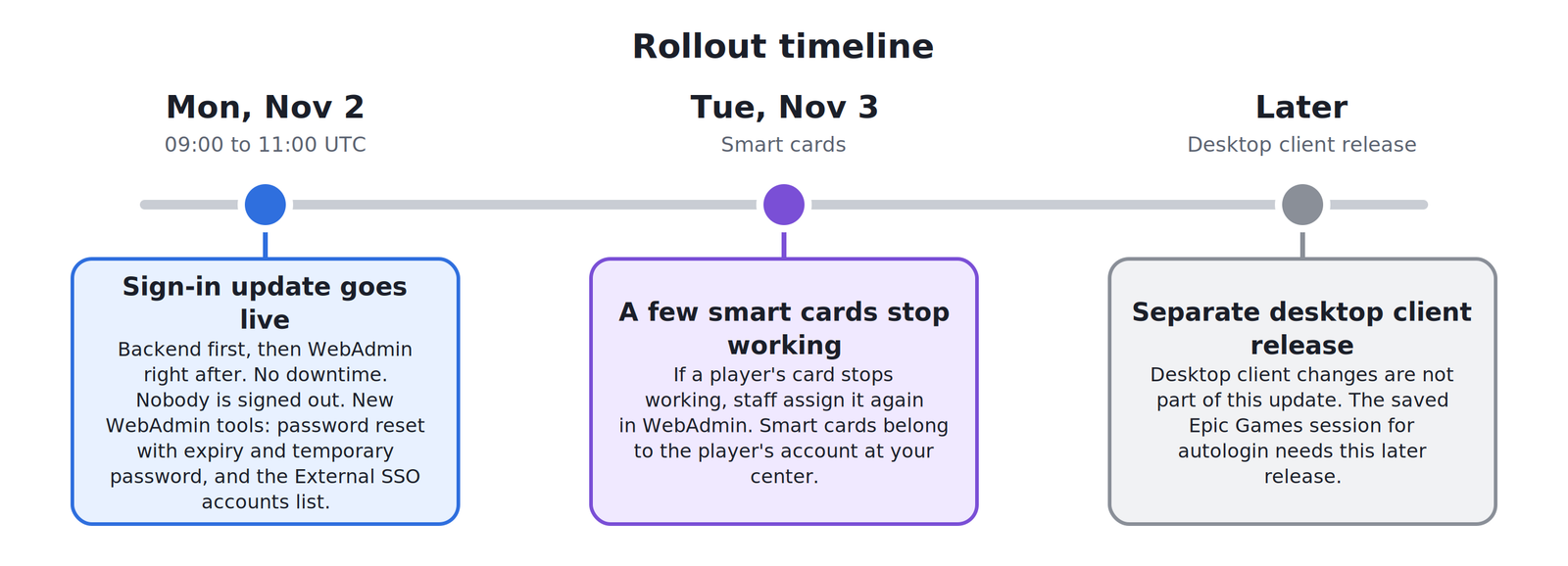
- If you are already signed in on a PC, mobile or the web, you stay signed in
- A few smart cards stop working on Tuesday, November 3. If yours does, ask staff to assign it again
Signing in with Google, Apple or Facebook
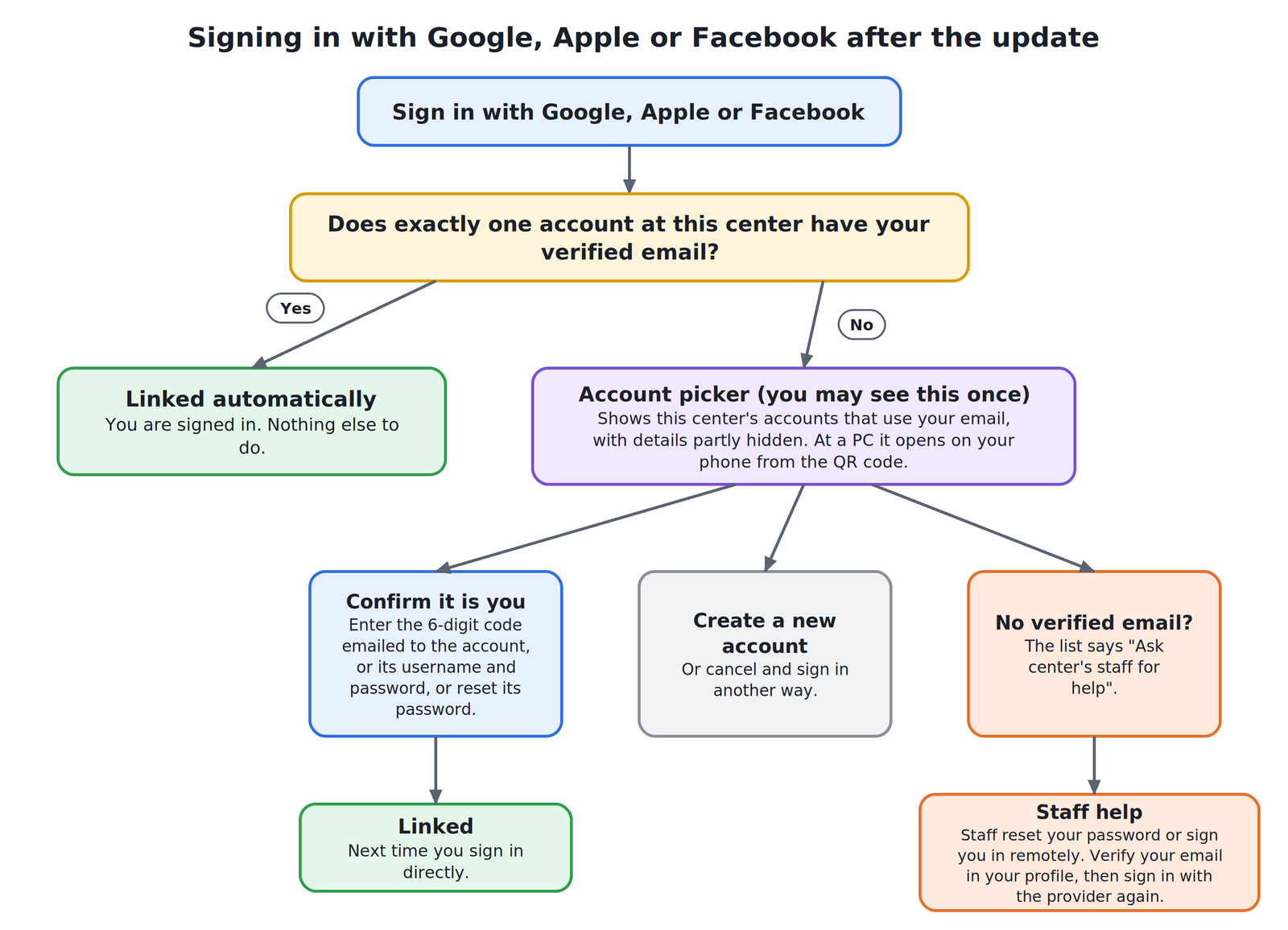
The first time you sign in with Google, Apple or Facebook after the update, you may be asked to confirm your account. This can happen once. After that you sign in directly.
- If exactly one account at the center has your verified email, it links automatically
- Otherwise you see a list of the center's accounts that use your email, with the details partly hidden. At a PC, this list opens on your phone from the QR code
- To confirm an account, enter the 6-digit code emailed to it, enter its username and password, or reset its password
- You can also create a new account or cancel
At a PC, your provider must have verified your email. If it has not, sign-in is refused.
If you cannot confirm your account
If your account has no verified email, the list shows "Ask center's staff for help". You have three options:
- Ask staff to reset your password, then sign in at the PC and verify your email in your profile. Your next Google, Apple or Facebook sign-in links automatically
- If you know your password at this center, sign in with it and verify your email in your profile yourself
- Create a new account at the center from the list
Staff cannot verify an email for you.
If your password stops working
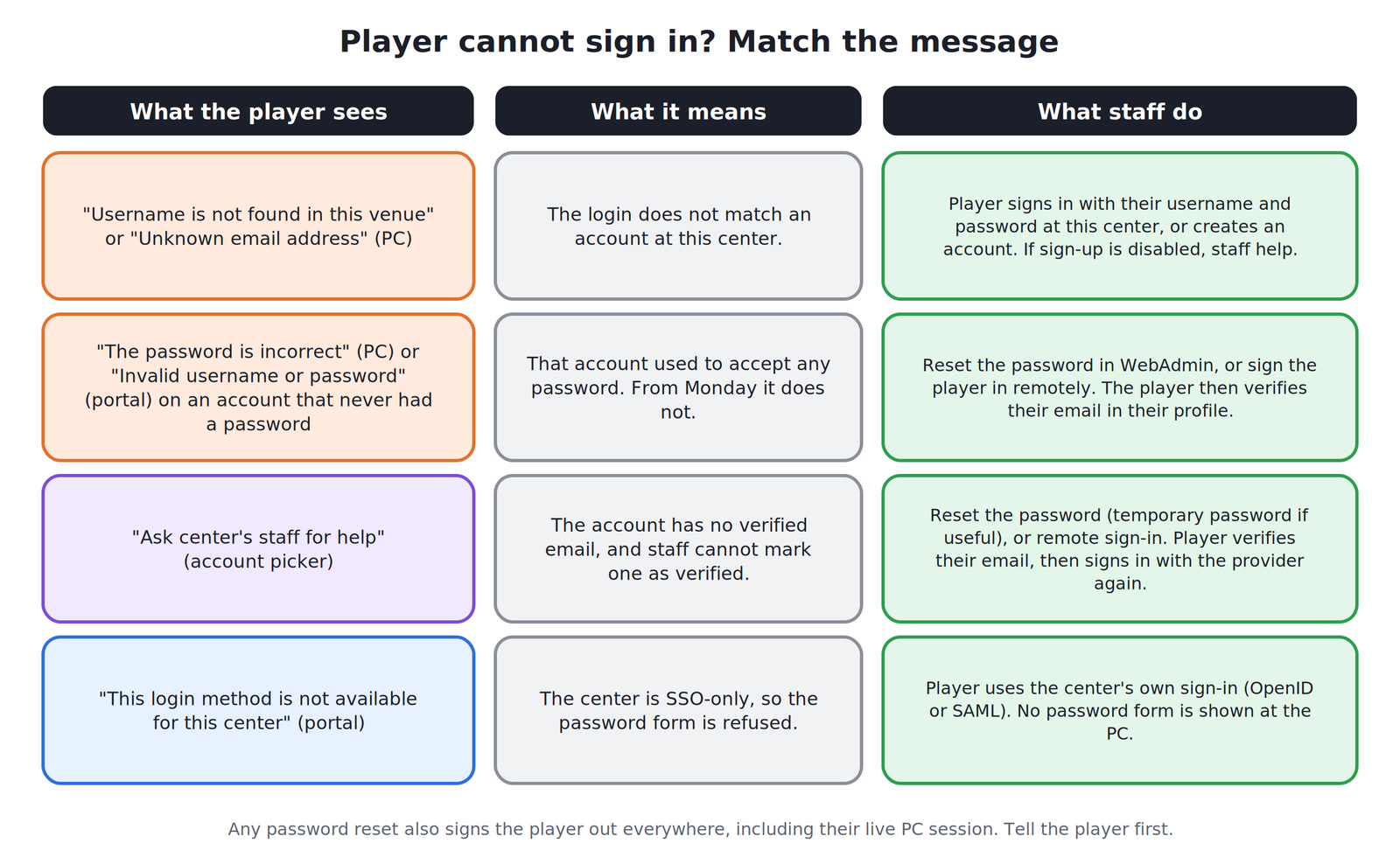
Accounts that never had a password used to accept any password at a PC. From Monday they don't. At a PC you will see "The password is incorrect", and on the web portal you will see "Invalid username or password". Ask staff to reset your password, or ask staff to sign you in remotely and then verify your email in your profile.
After any password reset, you are signed out everywhere, including your live session at a PC. Sign in again with the new password. If staff gave you a temporary password, it only works at the ggLeap client PC and asks you to choose a new password. Enter it correctly within 5 attempts.
For center staff and owners
Summary of changes
- A username or password that doesn't match the player's account at your center is refused. Reset the password in WebAdmin if needed
- Some players are asked once to confirm their account on their first Google, Apple or Facebook sign-in after the update
- Nobody is signed out at the update, and current desktop clients keep working
- A center account that never had a password used to accept any password at the PC. From Monday it doesn't. Staff remote sign-in still works, and a player who signs in on their own needs a staff password reset. Centers with password sign-in turned off are not affected
- Existing center OpenID links need no configuration change, but each of those players goes through the automatic link or the account picker once. SAML is unchanged
- The update runs Monday between 09:00 and 11:00 UTC with no downtime. WebAdmin is updated right after, so the new staff screens below are available from Monday
Account picker and linking
- If exactly one account at your center has the player's verified email, it links automatically
- If two accounts share a verified email, neither links automatically. The player sees both, masked, and confirms one by the emailed code (both go to the same inbox) or by that account's password
- A Google, Apple or Facebook sign-in with no email cannot link automatically. On the web portal it is refused. At a PC the player goes to the picker if an earlier Apple or Google link points to an account at your center, otherwise they see the create-account form
- An Apple Hide My Email address is treated like any other email. It links automatically only to an account that already has that address as its verified email
- Desktop sign-in refuses an email the provider has not verified. A Google or Facebook sign-in that verified the same email marks the player's email verified
- The create-account form refuses an email that an account at your center already holds. A player who signs up under a different email cannot be matched to their earlier account, so staff handle that case at the center
- The sign-up disabled setting covers manual sign-up only. A first Google, Apple or Facebook sign-in with no matching account still creates the account at the PC
Helping a player who cannot confirm their account
Staff cannot mark an email as verified. Use one of these options:
- Reset the player's password in WebAdmin, with a temporary password if useful. The player signs in at the PC, verifies their email in the profile, and their next provider sign-in links automatically
- Sign the player in remotely at a PC. The player verifies their email in the client profile, then signs in with the provider again
- A player who knows their password at your center can sign in with it and verify their email themselves
- The player can also create a new account from the picker
What players see when a login fails
- PC, sign-up disabled: "Username is not found in this venue" with a prompt to use an email address or create an account. The create-account link is hidden, so the player needs staff help. If they enter an email, they see "Unknown email address"
- PC, SSO-only center: no password form is shown
- Web portal: "Invalid username or password". At an SSO-only center the password form shows "This login method is not available for this center."
- Account with no password: "The password is incorrect" at the PC and "Invalid username or password" on the portal. After a staff password reset, the player signs in within the reset window and sets a new password; after that it works as usual
- Picker: "Ask center's staff for help" means the account has no verified email
Password resets
Any password reset signs the player out everywhere, including their live PC session. The reset dialog does not warn about this, so tell the player before you reset.
From Monday the reset dialog in WebAdmin lets you set an expiry from 5 minutes to 7 days (1 hour by default) and an optional temporary password of at least 6 characters. The temporary password works only at the ggLeap PC client, before it expires, and asks the player for a new password. It is refused on web, mobile, PC unlock and the account picker. The fifth wrong attempt ends it.
A player created by staff without a password has 60 minutes to sign in.
Linked accounts and unlinking
From Monday, the External SSO accounts screen in WebAdmin lists a player's Google, Apple and Facebook links and lets you unlink one. You need the Update user permission, and you must enter a reason. Unlinking is recorded in the activity log. The default Admin role has this permission, and other roles are set by each center. The list shows only links made after the update, so it is empty for a player until they sign in again.
Smart cards
A few smart cards stop working on Tuesday, November 3. Staff assign them again in WebAdmin. Smart cards belong to the player's account at your center.
Network balance transfer
Balance transfer finds source accounts by the player's verified email, one account per center. It runs only when a player signs in at a PC, never from the web portal. Nothing moves if any of these apply:
- The email on the signing-in account is not verified
- A source center has two accounts with that email (other centers still transfer)
- The source account has no verified email, or uses a different currency or data region
- The source account does not have a positive balance, or is locked or closed
No error is shown to the player and nothing is written to the activity log. Transfer in and out entries appear only when money moves. To find out why a transfer did not happen, compare the player's accounts at each center in the network by hand.
Other changes
- TourneyBit: sign-in is refused at a center whose TourneyBit add-on is off
- Saved Epic Games sessions: a new center-level launcher setting lets a center save the signed-in Epic Games session. It is off by default, and no center loses a setting. Using the saved session for autologin needs an upcoming desktop client release
- App launch limit: a PC sending more than 20 app launches a minute is refused. Only a client stuck in a loop reaches this
- Removed: the prize fulfilment form in ggHome and client leaderboard payouts. Prizes are still allocated and recorded, and client leaderboards stay
- Activity log: a player's own profile changes, SSO links and unlinks, and every email change now appear there
- Championships: coins go to the player's account at the center where they played
Desktop client changes are not part of this update. They come later in a separate client release.