

 Español
 中文
 العربية
How to initiate a guest session
If a customer doesn't want to create an account in your center, you may register them as a guest.
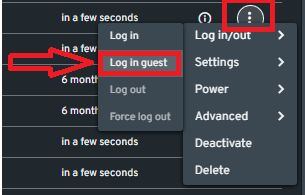
- On the Dashboard section of the web admin, click the 3 vertical dots (⋮) on the right end of an available PC or console.
- Hover on "Log in/out"
- Click the "Log in guest".
List view
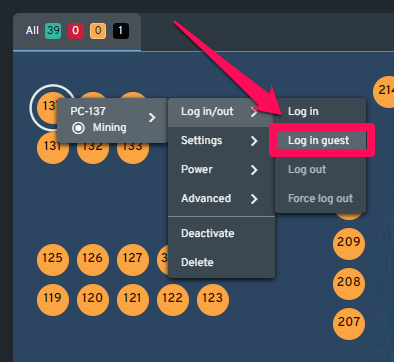
Graphical view
Note: You can select several PCs if there is more than one guest user.
Guest session menu
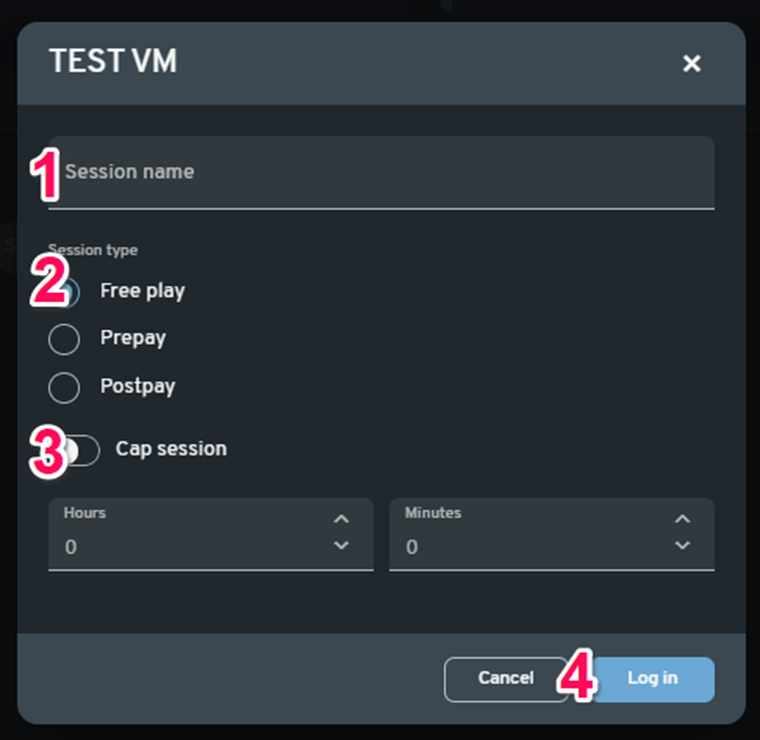
(1) Session Name- This allows you to identify the guest user. You can name the session whatever you like (optional).
(2) Session Type- Type of guest session you want.
- Free play - Allows a guest to play for free.
- Prepay - The guest will need to pay prior to starting the session. Note that the price per hour will depend on what is set in Financial Configuration.
- Postpay - The guest will pay after the session has ended.
(3) Cap Session- This allows you to set a specific amount of game time or keep it open-ended (only applicable in Free play or Postpay sessions).
(4) Log in - This will start the guest session