

 Español
 中文
 العربية
Bookings
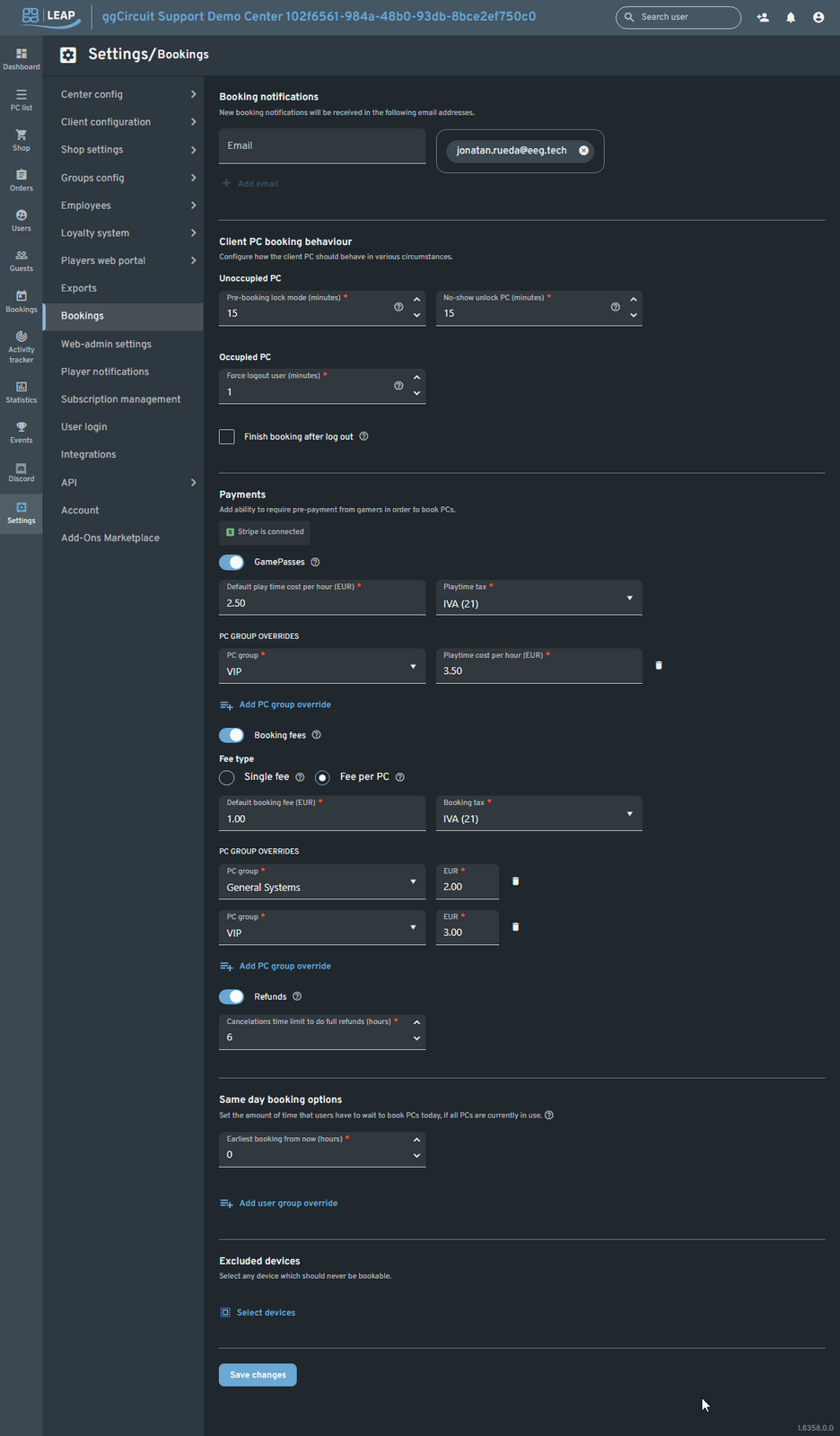
Bookings
Location: Settings ▶ Bookings
Configure how online reservations work—notifications, lock-out rules, pricing, refunds, and advanced options for PC groups and user tiers.
Booking Notifications
- Email list
Enter one or more staff emails to receive new-booking alerts. - + Add email
Use to add additional notification recipients.
Client PC Booking Behaviour
Unoccupied PCs
- Pre-booking lock mode (minutes)
Automatically locks the PC this many minutes before a scheduled booking. - No-show unlock PC (minutes)
After a no-show, unlocks the PC this many minutes after the scheduled start.
Occupied PCs
- Force logout user (minutes)
Terminates an existing session this many minutes before a booking if the user is still logged in. - Finish booking after log out
When checked, any remaining pre-booked time is automatically consumed right after the forced logout.
Payments
GamePass Pricing
- Toggle GamePasses to require pre-payment via GamePass balance.
- Default play time cost per hour & Tax (e.g., EUR 2.50, IVA 21).
- PC group overrides
Apply custom per-hour rates for specific PC groups (e.g., VIP at EUR 3.50/h).
Booking Fees
-
Toggle Booking fees to add a fixed reservation fee.
-
Fee type:
-
Single fee: one flat fee per booking
-
Fee per PC: fee applied for each reserved machine
-
Default booking fee & Tax (e.g., EUR 1.00, IVA 21).
-
PC group overrides
Define per-group booking fees (e.g., VIP EUR 3, General Systems EUR 2).
Refunds
- Toggle Refunds on/off.
- Cancellations time limit (hours)
Full refunds only if cancelled this many hours before the booking start (e.g., 6 h).
Same-Day Booking Options
- Earliest booking from now (hours)
Enforce a minimum wait time before a same-day booking can begin (default 0 h). - User group overrides
Allow different wait times per user group (e.g., VIP zero-wait, Free 1 h).
Excluded Devices
- Select devices
Choose any PCs or consoles that should never appear in the booking widget (e.g., demo machines, staff PCs).
Tip:
- Stagger your pre-booking lock and no-show unlock windows to maximize utilization while minimizing no-shows.
- Use PC group overrides to upsell premium rigs at higher hourly rates or fees.
- Set a modest cancellation window to protect revenue without overly penalizing customers.