

 Español
 中文
 العربية
Financial configuration overview
Set up your center's payment methods, tax calculation and more.
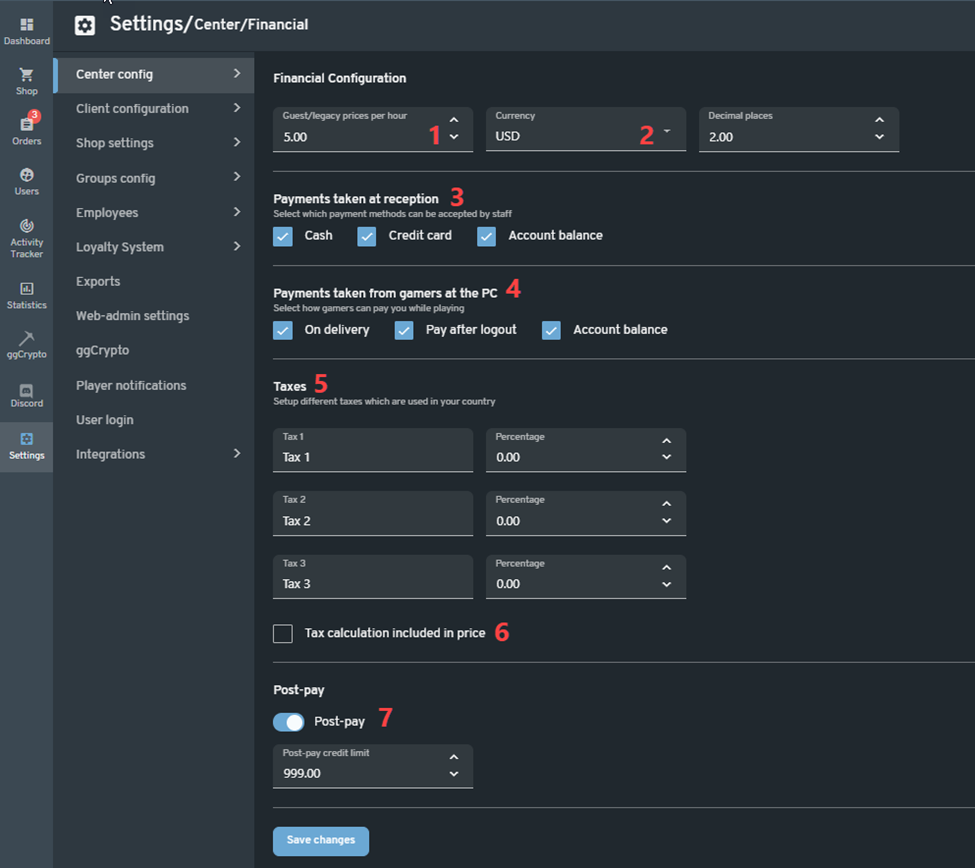
In the web admin, go to Settings > Center config > Financial configuration.
-
This will be the default price per hour for Guest sessions and Legacy time (time added without the use of time offers).
-
This will let you choose the currency and how many decimal places for the transaction amount.
-
This will let you choose the payment methods for the shop in the web admin.
-
This will let you choose the payment methods for the client shop in the client pcs.
-
This will let you configure the tax/VAT percentage for your offers/products.
-
This will enable you to include tax calculations in prices.
-
This will allow you to accept post-pay orders and set the amount of post-pay credit limit (the amount can be overridden during registration or by editing the user's profile).

NOTE: As of this writing, the Stripe payment method only works with user membership
payment and verified partner events upgrade.