

 Español
 中文
 العربية
League of Legends being forced to close every after matches
- Admin mode the client PC2. Login to Riot3. Launch League of Legends4. Click the gear icon at the top right corner of the launcher screen5. Under the General Settings, Set the Closed Client During Game to "Never"6. Click Done
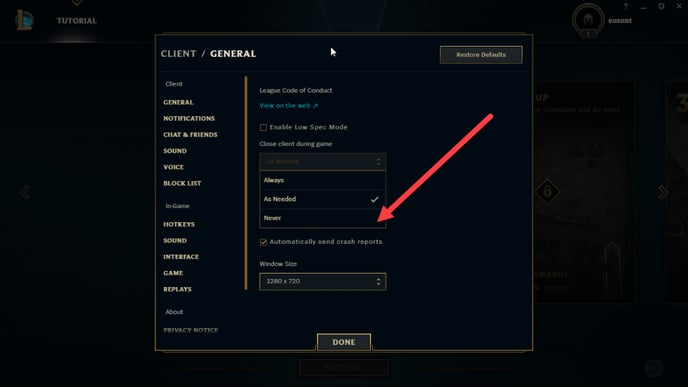
**NOTE:**If you are using ggRock (or any diskless system), make sure that you enable writeback on the machine you will be setting up this option. Launch the game, logout the account, and then apply writeback.
Was this article helpful?
More in Games & launchers
- 🛠️ League of Legends Crashing – Troubleshooting Guide
- Final Fantasy XIV: "An unexpected error has occurred. Exiting FINAL FANTASY XIV.(6d)"
- Marvel Rivals via Epic Games Launcher not working in ggLeap
- RIOT Game Language is changed from default
- Troubleshooting: Steam Connectivity - How to Force TCP with the -tcp Parameter