

 English
 Español
 العربية
Grafana 仓库问题
问题
运行以下命令时会显示以下错误
apt-get update
或
ggrock-linux-configurator
错误:
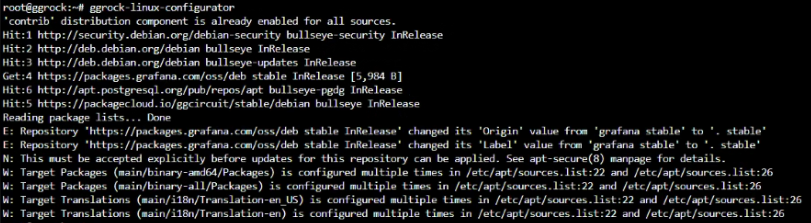
root@ggrock:~# ggrock-Linux-configurator
'contrib' distribution component is already enabled for all sources.
Hit:1 [http://security.debian.org/debian-security](http://security.debian.org/debian-security) bullseye-security InRelease
Hit:2 [http://deb.debian.org/debian](http://deb.debian.org/debian) bullseye InRelease
Hit:3 [http://deb.debian.org/debian](http://deb.debian.org/debian) bullseye-updates InRelease
Get:4 [https://packages-grafana.com/oss/deb](https://packages-grafana.com/oss/deb) stable InRelease [5,984 B]
Hit:6 [http://apt-postgresql.org/pub/repos/apt](http://apt-postgresql.org/pub/repos/apt) bullseye-pedg Inkelease
Hit:5 [https://packagecloud.io/gecircuit/stable/debian](https://packagecloud.io/gecircuit/stable/debian) bullseye InRelease
Reading package lists... Done
E: Repository
[https://packages.grafana.com/oss/deb](https://packages.grafana.com/oss/deb) stable InRelease' changed its 'Origin' value from 'grafana stable' to
E: Repository
[https://packages-grafana.com/oss/deb](https://packages-grafana.com/oss/deb) stable InRelease' changed its 'Label' value from 'grafana stable' to
stable' stable
N: This must be accepted explicitly before updates for this repository can be applied. See apt-secure 8)  manage for details.
W: Target Packages (main/binary-and64/Packages) is configured multiple times in /etc/apt/sources. list:22 and /etc/apt/sources. list:26
W: Target Packages (main/binary-all/Packages) is configured multiple times in /etc/apt/sources.list:22 and /etc/apt/sources.list:26
W: Target Translations (wain/118n/Translation-en_US) is configured multiple times in /etc/apt/sources.list:22 and /etc/apt/sources.list:26
W: Target Translations (wain/118n/Translation-en) is configured multiple times in /etc/apt/sources.list:22 and /etc/apt/sources.list:26
解决方案
更新您的密钥库以包含新的 Grafana 仓库密钥
sudo apt-key adv --keyserver keyserver.ubuntu.com --recv-keys 963FA27710458545
apt-get update --allow-releaseinfo-change
apt-get upgrade
然后运行
ggrock-linux-configurator
注意:
您的仓库密钥可能与上述不同 - 如果是这样,您需要将第一个命令中的密钥替换为 ggrock-linux-configurator 命令输出中的密钥。