

 English
 Español
 العربية
Grafana - 值冲突错误
您遇到此错误是因为您的系统对同一个APT源([https://apt.grafana.com](https://apt.grafana.com`))有冲突的Signed-By值。这意味着您的Grafana APT源条目中引用了两个不同的密钥环文件。
E: Conflicting values set for option Signed-By regarding source [https://apt.grafana.com/](https://apt.grafana.com/) stable: /etc/apt/keyrings/grafana.gpg != /usr/share/keyrings/grafana.key E: The list of sources could not be read.
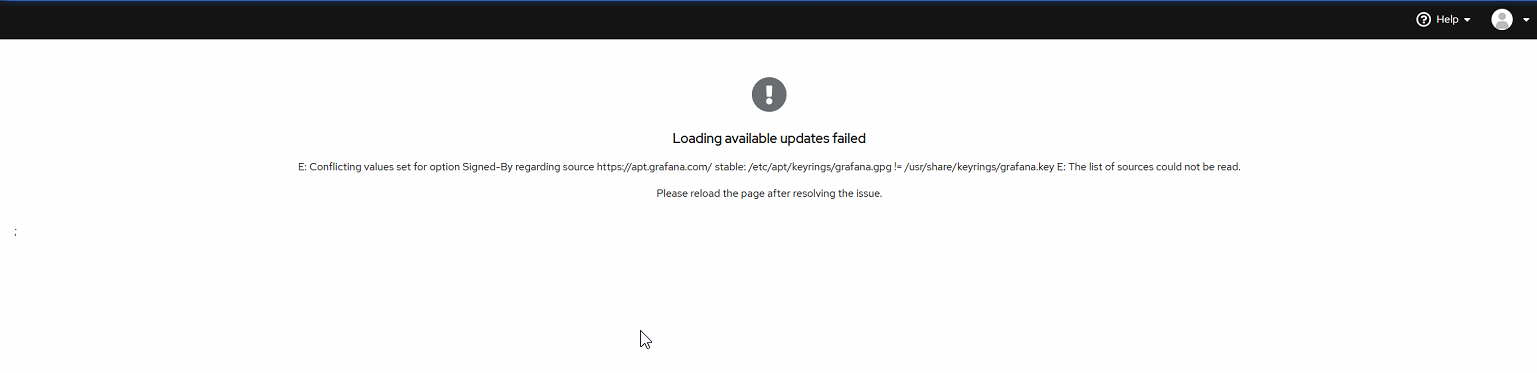
您通常会在Debian Control Panel的Software Updates标签中看到此错误。
您还会在运行以下命令时看到此错误:
ggrock-linux-configurator

如何修复此问题
步骤1:找到冲突的APT条目
运行以下命令来找到[https://apt.grafana.com](https://apt.grafana.com`)的定义位置:
bash
grep -r "[https://apt.grafana.com"](https://apt.grafana.com") /etc/apt/
您可能会看到多个文件,例如:
swift
/etc/apt/sources.list.d/grafana.list
/etc/apt/sources.list
检查这些条目中是否有一个带有signed-by=/etc/apt/keyrings/grafana.gpg,另一个带有signed-by=/usr/share/keyrings/grafana.key。
步骤2:
删除额外的密钥环文件,仅保留sources.list
步骤3:
再次运行搜索命令应该只从/etc/apt中为grafana返回1个条目:
root@ggrock:~# grep -r "[https://apt.grafana.com"](https://apt.grafana.com") /etc/apt
/etc/apt/sources.list:deb [signed-by=/etc/apt/keyrings/grafana.gpg] [https://apt.grafana.com](https://apt.grafana.com) stable main