

 Español
 中文
 العربية
Understanding and Using Additional Launch Parameters in ggLeap (Steam Example)
What are Additional Launch Parameters?
Launch parameters are command-line options that modify a game’s settings before it runs. These options can override in-game settings, helping to recover from incompatible video configurations or troubleshoot various issues.
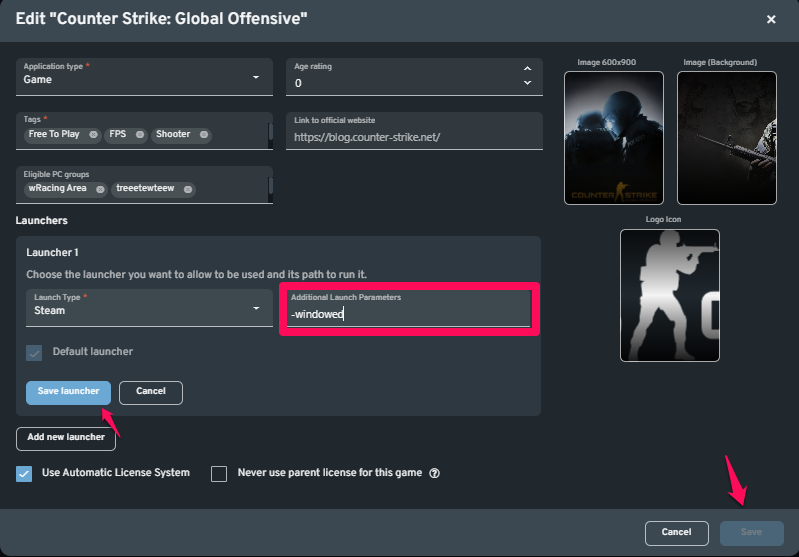
For example, to force a game to start in windowed mode regardless of in-game settings (such as with Counter-Strike), add -windowed to the Additional Launch Parameters field in ggLeap.
Setting Game Launch Options in Steam
Launch options can be configured through:
- Steam’s Library (right-click the game > Properties > Launch Options)
- Creating a custom game shortcut with specified options
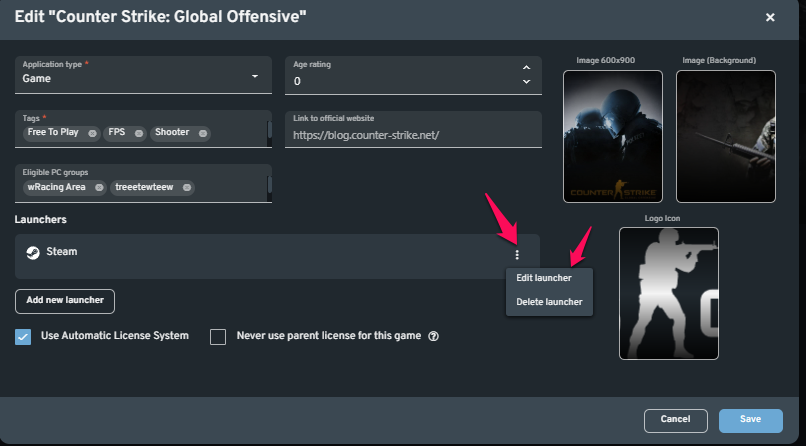
- ggLeap’s Additional Launch Parameters field for games on client PCs
⚠️ Note: The launch options listed below apply only to Valve's GoldSrc and Source engine games. Most third-party titles do not support these.
🔧 Common Launch Options
| Launch Option | Description |
|---|---|
-autoconfig |
Resets video/performance settings to default based on current hardware. Ignores config files until removed. |
-dev |
Enables developer mode and disables certain UI elements like the quit dialog. |
-condebug |
Logs console output to console.log. |
-console |
Opens the game with the developer console enabled. |
-toconsole |
Starts the game directly in console mode. |
-dxlevel <level> |
Forces a specific DirectX version (e.g., -dxlevel 90). Useful for compatibility/performance. Supported levels: 80, 81, 90, 95, 98. |
-fullscreen |
Starts the game in fullscreen mode. |
-windowed or -sw |
Starts the game in windowed mode. |
-16bpp / -32bpp |
Sets color depth. (GoldSrc only) |
-w <width> |
Sets the screen width (e.g., -w 1280). |
-h <height> |
Sets the screen height. If omitted, height is determined automatically. |
-refresh <rate> |
Sets a specific screen refresh rate. |
-heapsize <kilobytes> |
Specifies memory allocation for the game. |
-nocrashdialog |
Suppresses certain crash dialog messages. |
-novid / -novideo |
Skips the Valve intro video. |
-lv |
Enables low-violence mode (Left 4 Dead only). |
-sillygibs |
Enables low-violence mode (Team Fortress 2 only). |
🎮 Launch Options for Graphics & Performance Tuning
| Command | Description |
|---|---|
+r_rootlod # |
Model detail (0 = High, 1 = Medium, 2 = Low) |
+mat_picmip # |
Texture detail (0 = High, 1 = Medium, 2 = Low) |
+mat_reducefillrate # |
Shader detail (0 = High, 1 = Low) |
+r_waterforceexpensive # |
Water quality (0 = Low, 1 = High) |
+r_waterforcereflectentities # |
Water reflectiveness (0 = Low, 1 = High) |
+r_shadowrendertotexture # |
Shadow quality (0 = Low, 1 = High) |
+mat_colorcorrection # |
Color correction (0 = Low, 1 = High) |
🔍 Filtering Modes
| Command | Description |
|---|---|
+mat_trilinear 0 |
Use bilinear filtering (least intensive) |
+mat_trilinear 1 |
Use trilinear filtering |
+mat_forceaniso # |
Anisotropic filtering (# = 2, 4, 8, or 16) |
+mat_hdr_level # |
HDR lighting (0 = Off, 2 = Full) |
🧰 Useful Steam Client Launch Options
| Option | Function |
|---|---|
-login <user> <password> |
Bypasses the login window with credentials. |
-tcp |
Forces Steam to use the TCP protocol instead of UDP. |
-clearbeta |
Opts out of any Steam beta participation. |
-silent |
Starts Steam minimized to the system tray. |