

 Español
 中文
 العربية
Grafana - Conflicting Values set Error
You're getting this error because your system has conflicting Signed-By values for the same APT source ([https://apt.grafana.com).](https://apt.grafana.com`).) That means two different keyring files are being referenced in your Grafana APT source entries.
E: Conflicting values set for option Signed-By regarding source [https://apt.grafana.com/](https://apt.grafana.com/) stable: /etc/apt/keyrings/grafana.gpg != /usr/share/keyrings/grafana.key E: The list of sources could not be read.
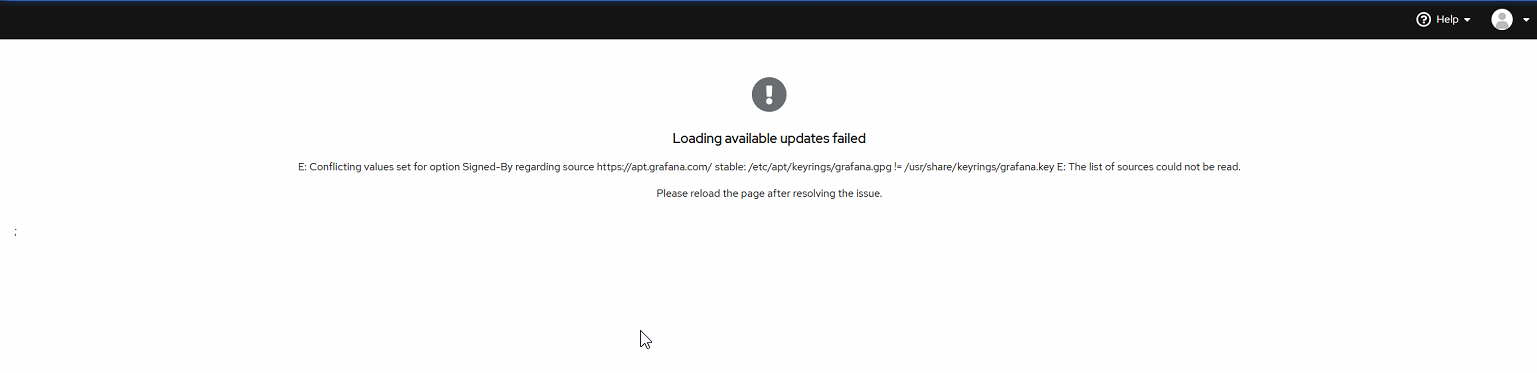
You’ll usually see this error under Software Updates tab in Debian Control Panel.
Also you’ll see this error when running :
ggrock-linux-configurator

How to Fix the Issue
Step 1: Locate the conflicting APT entries
Run the following to find where [https://apt.grafana.com](https://apt.grafana.com`) is defined:
bash
grep -r "[https://apt.grafana.com"](https://apt.grafana.com") /etc/apt/
You’ll likely see multiple files like:
swift
/etc/apt/sources.list.d/grafana.list
/etc/apt/sources.list
Check if any of those entries have signed-by=/etc/apt/keyrings/grafana.gpg and another has signed-by=/usr/share/keyrings/grafana.key.
Step 2:
Remove the extra keyring files leaving only sources.list
Step 3:
Another run of the search command should return only 1 entry from /etc/apt for grafana:
root@ggrock:~# grep -r "[https://apt.grafana.com"](https://apt.grafana.com") /etc/apt
/etc/apt/sources.list:deb [signed-by=/etc/apt/keyrings/grafana.gpg] [https://apt.grafana.com](https://apt.grafana.com) stable main