

 Español
 中文
 العربية
ggRock Machine Boot stuck on "Could not boot image: Error 0x3d222083"
Problem
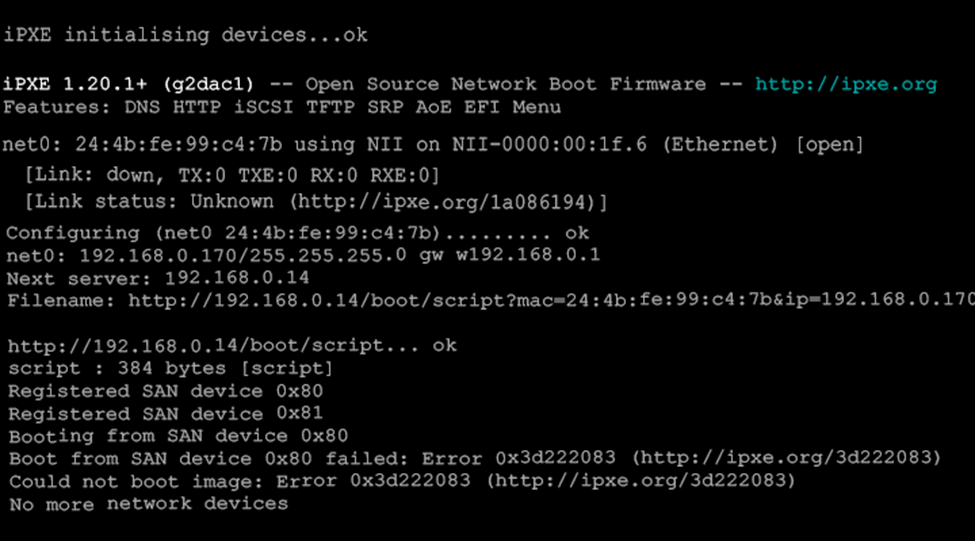
The following error occurs during the boot process:
Boot from SAN device 0x80 failed: Error 0x3d222083 (http://ipxe.org/3d222083 )
Could not boot image: Error 0x3d222083 (http://ipxe.org/3d222083 )
No more network devices
Solution
Configure systems to boot in "Legacy" mode rather than UEFI mode (presuming your image was built in Legacy mode).
Was this article helpful?
More in Boot & PXE errors
- 🧩 PXE Boot Fails with PXE-E21 (Remote Host Cancelled)
- Booting Many ggRock Machines at Once Results in a large portion of the PCs not loading data on boot (files missing on System and Games drive
- Cannot boot one system, unable to delete from ggRock Web UI
- Diskless PCs Fail to PXE Boot After a Meraki/Cisco Switch Firmware Upgrade (STP Edge-Port / PortFast Fix)
- Getting Device Ready Boot Loop After Image Creation