

 Español
 中文
 العربية
ggRock Client Machine Blue Screen - "inaccessible boot device"
Problem
The following blue screen appears:
INACCESSIBLE_BOOT_DEVICE
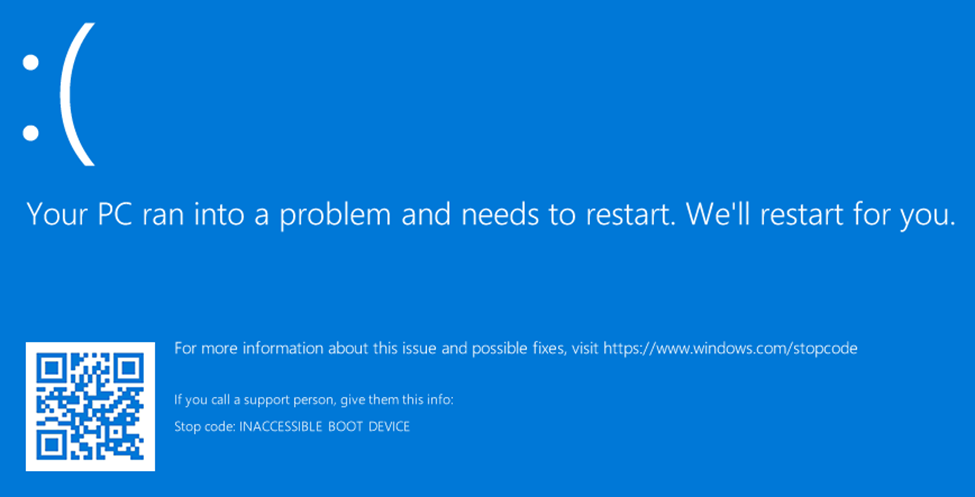
Solution 1
Review theConfigure ggRock Guide, ensuring that your VHD image file was created correctly, including:
- Disable Secure Boot (remove all keys)
- Configure BIOS in UEFI mode (fall back to legacy mode if this fails)(Storage and PXE boot settings)
Additionally, as a troubleshooting step it can be helpful to boot the image in a VM with the following settings:
Solution 2
Ensure your Windows OS is correctly configured, including:
- Disable Windows Updates (it is important to do this before you make your VHD with the ggRock IC tool)
- Disable Defragmentation
Solution 3
Ensure that the hard drive or SSD has been removed from each Machine.
Solution 4
If your center has Machines with multiple different Network Cards or Motherboards, it is necessary to capture information on the network card from each different Motherboard/Network Card using the ggRock IC Tool. See the "Adding a New Machine Type to a ggRock Image using the ggRock Seamless Boot Procedure" guide for detailed steps.
Did this answer your question?
Was this article helpful?
More in Boot & PXE errors
- 🧩 PXE Boot Fails with PXE-E21 (Remote Host Cancelled)
- Booting Many ggRock Machines at Once Results in a large portion of the PCs not loading data on boot (files missing on System and Games drive
- Cannot boot one system, unable to delete from ggRock Web UI
- Diskless PCs Fail to PXE Boot After a Meraki/Cisco Switch Firmware Upgrade (STP Edge-Port / PortFast Fix)
- Getting Device Ready Boot Loop After Image Creation