Español
 中文
 العربية
🗄️ggRock Server NIC Teaming / Bonding / Link Aggregation
This guide outlines recommended bonding configurations between a ggRock Server and network switches to ensure optimal performance and reliability.
📚 Table of Contents
- About
- Supported Bonding Modes
- IEEE 802.3ad (LACP)
- Active-Backup
- Conclusion
- Appending 1: Performance Testing
- Appendix 2: Mode Comparison
🧠 About
Bonding—also known as NIC teaming or link aggregation—is a method of combining multiple network interfaces to improve:
- ✅ Fault Tolerance
- 🚀 Performance
- ⚖️ Load Balancing
⚙️ Supported Bonding Modes
Linux supports seven bonding modes, but only two are recommended for use with ggRock:
🧩 IEEE 802.3ad (LACP - Dynamic Link Aggregation)
Key Benefits:
- Utilizes multiple NICs simultaneously
- Provides both fault tolerance and load balancing
Requirements:
- Network switch must support LACP (IEEE 802.3ad)
- NICs must have the same speed and work in full-duplex
- All NICs should connect to the same switch
- Server and clients must be on the same local network
Recommended Settings:
- Transmit Hash Policy:
layer2+3(recommended) - Link Monitoring:
mii - Monitoring Interval (miimon):
100 ms
🛠 Sample Configuration:
Configuration without 802.3ad bonding
auto lo
iface lo inet loopback
iface eth0 inet manual
iface eth1 inet manual
auto vmbr0
iface vmbr0 inet static
address 192.168.0.2
netmask 255.255.255.0
gateway 192.168.0.1
bridge_ports eth0
bridge_fd 0
bridge_stp off
Configuration WITH 802.3ad bonding
auto lo
iface lo inet loopback
auto eth0
iface eth0 inet manual
auto eth1
iface eth1 inet manual
auto bond0
iface bond0 inet manual
bond-slaves eth0 eth1
bond-mode 802.3ad
bond-miimon 100
bond-xmit-hash-policy layer2+3
auto vmbr0
iface vmbr0 inet static
address 192.168.0.2
netmask 255.255.255.0
gateway 192.168.0.1
bridge_ports bond0
bridge_fd 0
bridge_stp off
Switch Configuration Required:
Ensure the switch is properly configured for LACP with matching hash policy and link monitoring.
🔁 Active-Backup Bonding
Key Benefits:
- Provides fault tolerance with no switch configuration required
How It Works:
- Only one NIC is active at any time.
- If the active NIC fails, another takes over.
Recommended Settings:
- Miimon:
100 ms
🛠 Sample Configuration:
Configuration without Active-Backup bonding
auto lo
iface lo inet loopback
iface eth0 inet manual
iface eth1 inet manual
auto vmbr0
iface vmbr0 inet static
address 192.168.0.2
netmask 255.255.255.0
gateway 192.168.0.1
bridge_ports eth0
bridge_fd 0
bridge_stp off
Configuration WITH Active-Backup bonding
auto lo
iface lo inet loopback
auto eth0
iface eth0 inet manual
auto eth1
iface eth1 inet manual
auto bond0
iface bond0 inet manual
bond-primary eth0
bond-slaves eth0 eth1
bond-mode active-backup
bond-miimon 100
auto vmbr0
iface vmbr0 inet static
address 192.168.0.2
netmask 255.255.255.0
gateway 192.168.0.1
bridge_ports bond0
bridge_fd 0
bridge_stp off
Switch Configuration:
None required. 🙌
✅ Conclusion
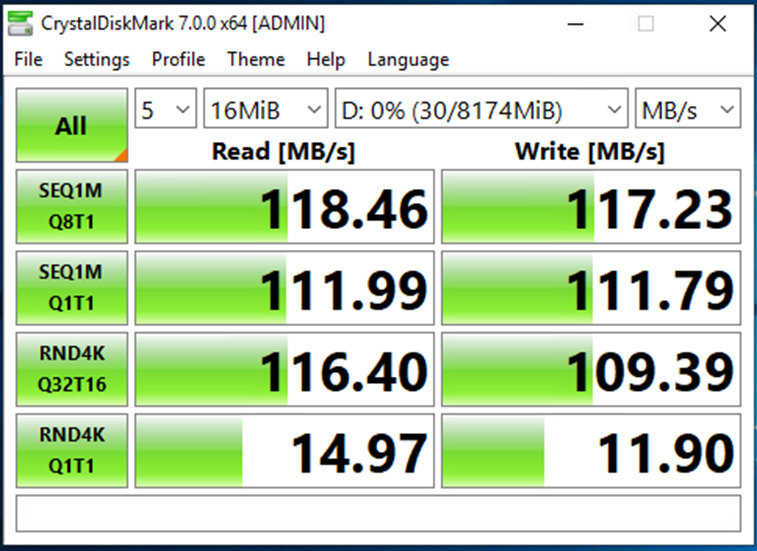
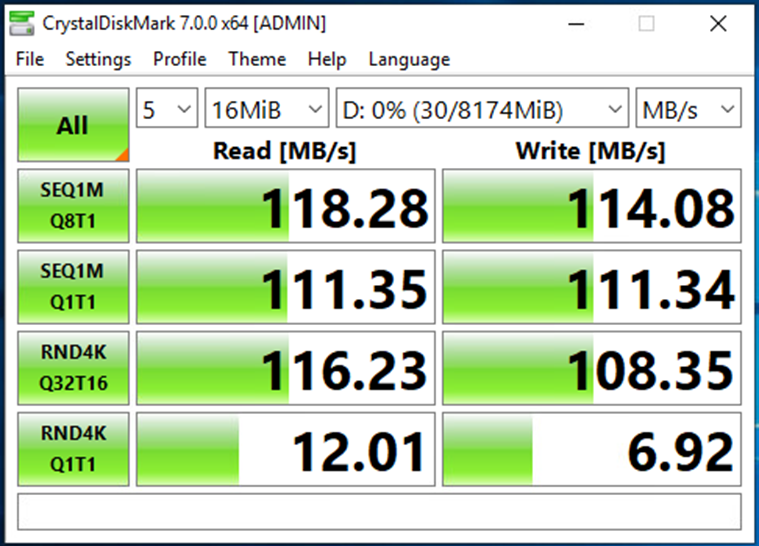
- Bonding does not improve throughput for a single iSCSI client connection
- Bonding can provide aggregated throughput when multiple clients are accessing the server
- No additional cost is required to implement bonding on supported systems
📊 Appendix 1 - Single Client PC Performance Testing
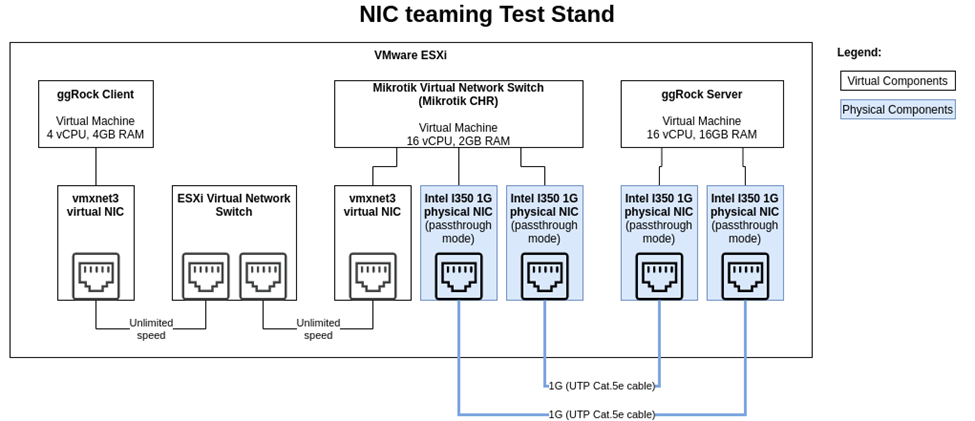
- Single 1G NIC:
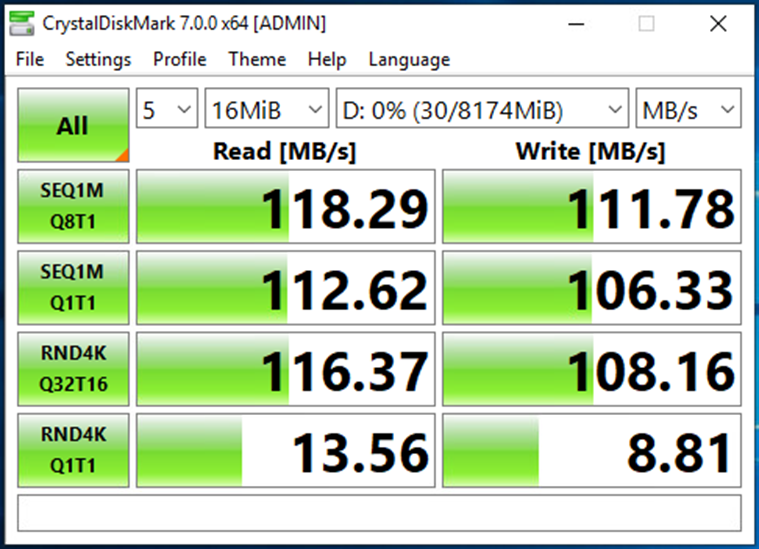
- 802.3ad (Two 1G NICs):
- Active-Backup (Two 1G NICs):
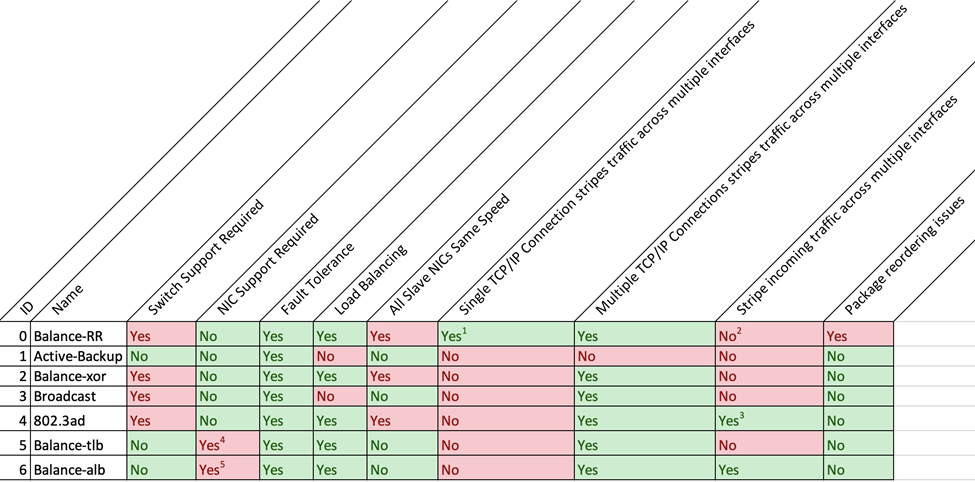
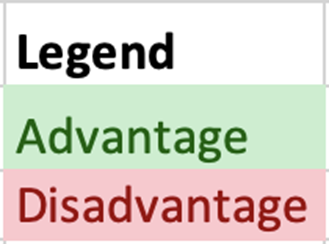
🧮 Appendix 2 - Bonding Mode Comparison (Advanced Users)